
The wearable that makes Alyssa's Law work in the classroom
The Lightspeed Cascadia is a teacher-worn wireless microphone system designed for classroom audio — but its integration with Ep3 transforms it into a front-line emergency response device. A single button press on the Cascadia mic is designed to trigger a silent panic alarm through Ep3, routing directly to 911 dispatch and simultaneously alerting school administrators — all without the teacher leaving the room or reaching for a phone (future capability; not available today).
Why Cascadia + Ep3 is the right answer for Alyssa's Law
Most panic alarm solutions require staff to reach a wall-mounted button, a desk phone, or a separate device — precious seconds lost in an active threat situation. The Cascadia mic is already on the teacher's body, every minute of every school day. Ep3 is designed to extend that wearable into campus calling with no additional hardware required in the classroom.
Device Specifications
Built for the classroom. Ready for emergencies.
Wearable form factor
Worn by teachers throughout the school day — no reaching for a wall button or desk phone
Single-button activation (planned)
One press triggers the silent alarm — no unlock, no menu, no delay
Wireless range
Operates throughout the classroom and hallway without line-of-sight to a base station
Ep3 SIP integration
A single pre-set call path from Cascadia today; direct registration, provisioning and emergency routing are on the proposed roadmap.
Simultaneous internal alert (planned)
Ep3 broadcasts to administrators, security staff, and overhead paging at the moment of activation
Location precision (planned)
Room-level dispatchable location transmitted with every alarm — supporting dispatchable location requirements
Proposed roadmap: a future capability we'd build with Lightspeed. Not available today.
Response Sequence
How Cascadia + Ep3 is designed to respond to a threat
In the planned design, every step after the teacher's button press would be automated — no phone call, no relay, no delay.
- 01
Teacher presses the Cascadia panic button (planned)
The wearable mic the teacher already has on sends an immediate silent alarm signal — no additional device needed.
- 02
Ep3 receives the alarm (planned)
In the planned design, the Cascadia system would hand the alert to Ep3.
- 03
Silent call routes directly to 911 dispatch (planned)
Ep3 places an automated silent emergency call to the local PSAP with the teacher's precise room location.
- 04
Administrators and security alerted simultaneously (planned)
Ep3 triggers internal paging, SIP alerts to designated staff phones, and EVA-assisted broadcast — all in the same instant.
- 05
Lockdown protocols initiated (planned)
Ep3 can trigger automated campus-wide paging and door-lock integrations to begin lockdown without manual intervention.
Proposed roadmap: a future capability we'd build with Lightspeed. Not available today.
Watch the emergency flow in real time
In the planned design, a single Cascadia button press is designed to trigger 911 dispatch via Ep3 SIP and activate campus-wide bells and paging at the same time.
Simultaneous dual-path trigger (planned)
911 SIP call and bells/paging fire at the exact same moment — not sequentially.
Room-level e911 location (planned)
Ep3 transmits dispatchable location data automatically with every emergency call.
No extra hardware required (planned)
The Clearmike the teacher already wears for audio amplification is designed to double as the panic button.
Illustrative Integration Example
Actual system behavior varies based on installed infrastructure and interoperability agreements. Compliance with Alyssa's Law is the responsibility of the school district. Endpoint UCS products support — not replace — established safety policies.
Trademark notice: Ep3 is built to work with Lightspeed Cascadia and Clearmike classroom audio systems. Lightspeed, Cascadia, Topcat Cascadia, C25 Cascadia and Clearmike are trademarks of Lightspeed Technologies, Inc. All other product names, logos and trademarks are the property of their respective owners.
Teacher Wearable Device
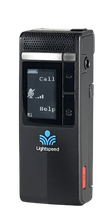
Emergency button (recessed)
Right side, lower
Check-in button
Activates after emergency triggered
Response Steps
- Clearmike ready — teacher wearing device
System monitoring. Emergency button is armed and ready. Check-in button activates only after an emergency has been triggered.
- Emergency button pressed
- Ep3 + Bells & Paging activate simultaneously
- 911 Dispatch connected · campus alerts broadcast
- Audio/Visual alerts active · security office notified
- All emergency systems engaged
- Teacher check-in (where supported)
Signal Flow
Integration depth varies by system and school configuration.
Available today: one Clearmike press reaches EVA over a single pre-set call path. Calls are one-way; the Clearmike doesn't receive calls. Direct registration and provisioning are on the proposed roadmap.
EVA in your ear — always within reach.
The programmable button on the Lightspeed Clearmike can be configured to dial EVA's extension directly through Ep3. One press connects the teacher to their AI assistant — completely hands-free.
Ask EVA to call a colleague by name, reach the front office, check the school calendar, answer schedule questions, send an email, or create an appointment. No phone or extension to remember — just speak naturally.
Illustrative Integration Example
Actual responses, connected systems, and available actions depend on each district's Ep3 deployment, directory integrations, and EVA knowledge base setup.
Teacher Wearable Device
EVA button (programmable)
Press to call EVA
Ep3 SIP call to EVA
Dials EVA extension automatically
Privacy tip
Plug in the lanyard earpiece before pressing the EVA button for a fully private, hands-free conversation.
EVA Capabilities
Click to see the flow
EVA capabilities depend on school system integrations and configuration.
Interaction Flow
- Clearmike ready — EVA button armed
The programmable button on the Clearmike is configured to dial EVA's extension. One press connects the teacher directly to their AI assistant.
- Button pressed — EVA answers
- Call a person by name
- Call a department or office
- Check or create appointments (planned)
- Answer school questions
- Send an email (texts planned)
- Get event or schedule info (planned)
Press the EVA button to begin
One press · instant connection
E911 Compliance Center
Know the laws that govern your deployment.
Ep3 is designed to support Alyssa's Law, Kari's Law, and Ray Baum's Act requirements — the three federal and state mandates that govern emergency communications in K–12 schools. Every requirement is different, and every state's adoption timeline varies.
Alyssa's Law
Requires schools to implement mobile panic buttons that directly notify first responders. Cascadia's wearable alerts and Ep3 calling are designed to work together toward this requirement.
Kari's Law
Mandates direct 911 dialing from multi-line phone systems — no prefix required. Endpoint's hosted phone system supports Kari's Law direct 911 dialing.
Ray Baum's Act
Requires dispatchable location data to be transmitted with every 911 call. Ep3 delivers room-level location automatically when an alert fires.
Trademark notice: Ep3 is built to work with Lightspeed Cascadia and Clearmike classroom audio systems. Lightspeed, Cascadia, Topcat Cascadia, C25 Cascadia and Clearmike are trademarks of Lightspeed Technologies, Inc. All other product names, logos and trademarks are the property of their respective owners.
Bringing existing phones to Ep3?
Check if your SIP devices are auto-provisioning compatible — or we'll manually configure any standard SIP phone.
Ready to plan Cascadia + Ep3 for your district?
Our K–12 communications specialists will assess your current infrastructure and design an Ep3 + Cascadia deployment — at no obligation.